Tuesday, June 28, 2011

Learn to use Student Response Systems with three easy steps

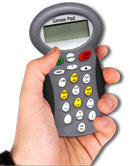
Students Response System; commonly known as ‘Clickers’ are those wondrous hand held devices which are getting widely used in classrooms of today. Clickers have so intelligently adapted themselves into the education system of today that one can’t imagine teaching without them.

Moreover, this ‘New Era’ gadget is superbly contrived to carry out an effective two-way communication between teacher and students inside a classrooms and lecture halls. Lets me tell you how it works?


First step
Teacher asks a question with the help of her handset and the question gets projected on the large screen or interactive whiteboard.

Second Step
Students feed-in their respective answers in the form of true/false, yes/no, multiple choices, numeric and text which get stored into the attached computer.

Final Step
Teacher can display all the feedbacks and answers on the large screen in the form of table, graph and pie chart for students to see. Teachers can also discuss on individual or group performance regarding the poll or test she conducted. As a result; these useful student response systems helps in eradicating misconceptions, communication gaps and misunderstandings from the minds of students and motivated them to carry out open-ended discussions, polls and evaluations with utmost confidence.
Educators of today; prefer using Genee’s easy-to-use student response systems including Genee pad, pebble pad and iQ-pad; to teach their students. They believe that these unique clickers help students to understand key lessons and concept very easily and quickly.

Genee’s student response systems are extremely interoperable, flexible and can be used excellently with ClassComm software. Moreover; teachers can save a lot of time by using Genee’s response systems as compared to cumbersome and time consuming paper evaluation, result tallying and answer checking method.

Tuesday, June 21, 2011

Genee Sync- Incredible Classroom Management Software for Computer-Based Classrooms of Today

We all know that computers are turning out to be amazing educational tools, but, at the same time; they can also be a huge distraction to learning. The Internet, Social sites, games, online cricket, instant messaging and personal email are constant temptations for pupils.

Genee Sync is the most reliable classroom management software that removes all of these distractions so teachers can teach their pupils more effectively. It is a tool which gives the teacher control over student computer in real time, enabling a safe and personalised learning environment. Just a network connection between computers is what that’s required to run Genee Sync in a classroom. Teachers can monitor the classroom from their computer, present a lesson with annotation tools. Application program and Internet access can be managed with ease and comfort.

It’s the easiest to install and simplest to use; best suited for teaching in a computer-based classrooms. Some of the remarkable features offered by Genee Sync are as follows:-

Helpful in Reducing Pupil Distractions
This reliable classroom software is extremely helpful in reduction of pupil distractions. Teachers can instantly supervise student computer activity by monitoring their active desktops and by limiting their applications and web browsing usage. This not only helps teachers to take control over pupil’s machine in the classroom but also help teachers to keeps students on their respective task.

Instantly Monitors Students Activities
Genee Sync is one essential tool which instantly monitors pupil activities within a classroom setting. This classroom software prevent incorrect usage of class computers as its special Web Lock tool allows the teacher to be selective with internet content that can be viewed in the classroom by the pupils.

Useful in assessing pupil Understanding
With the help of this wondrous Learning software; teachers can do real time supervision of pupil’s computer usage and assess their understanding. Besides this, its App-Manager quickly manages and changes application which pupils can use or view.

Live Annotation over Pupil’s Screens
Teachers can instantly share their individual screen with the class. Its incredible Focus Tool allows instructor to annotate over student work and highlight key points. Not only this, with this Classroom software; teachers can instantly share one student’s desktop with the whole group of students or the entire class. From their individual computers, a student can promptly demonstrate or present his own answers to the whole class.

Advance shut down and lock feature
The best part is that Genee sync helps teachers to shut down or lock students systems by giving just a single command on their individual system.

Hassel free two way communication
With Genee sync a Teacher can create hassle free two way communication with each and every student individually. No need for worksheets as data can be directly send during class room sessions onto their individual computer screens.

Monday, March 28, 2011

Role of Visualisers in education


School, a place where children learn to play, discover, explore and unwind…

Just imagine! What will be the first reaction of those children; if, all of a sudden, a new teaching aid gets introduced in a 5th standard classroom.

Now; you must be wondering what this could be? And what this new teaching aid will do or change in the classroom?

Well, I would answer the second question first. This ‘secret’ teaching aid will do wonders in the classroom, for sure and this teaching aid can change or I can say, ‘Revive’ the whole spirit of that classroom.

Let me break the suspense…This teaching aid is a Vision Visualiser which is also known as Document Camera or Visual Presenter.  A Vision Visualiser is a type of video camera that is used to display text, 2D or 3D object on display devices like Interactive Whiteboards, plasma screens and touch screens.
           
As parents, we all know that how important schooling is for our little ones? At the same time, we also know that all the teaching solutions including Visualisers, Interactive Whiteboards, Student Response Systems and Projectors also play an equally important role in educating our children.

Genee’s entire range of Vision Visualisers is mesmerizing and worth considering. At the very first glance you will feel the difference. Genee’s Vision Visualiser or Visual Presenter has an ability to ‘revive’ the whole spirit of classroom teaching. These Vision Visualisers can help in grooming children in a much better way, if compared to conventional ways of teaching and learning.

The best part is that Genee’s whole range of Vision Visualisers is extremely useful in visualising the subject matter and improving their logical abilities and understanding of the subject.
Genee’s Vision Visualisers or Document Cameras are extremely useful in educating your kids because:-
·         Genee’s Vision Visualisers helps displaying artefacts and objects in close detail.
·         Interoperability is the key feature of these Vision Visualisers as they can be used in conjunction with data projectors, PC and interactive whiteboards.
·         Genee’s Visual Presenters help in reviewing and evaluating other student’s work by projecting it on a screen or whiteboard for group discussions or general comments.
·          Image freeze, zoom in & positive and negative conversion is also possible with Genee’s Vision Visualisers.
·         Genee’s Visual Presenters can be used for displaying even the complex details of any kind of tangible item, including fossils, photographs, books, 3D objects, X-ray film, art illustrations, maps and similar objects.
·         Genee’s Vision Visualisers work wonders in demonstrating art techniques such as color-mixing, object or paper cutting, origami, brushwork and shading in an art class.
·         Vision Visualisers can be best utilized in demonstrating geometrical technique such as how to use a scale, compass or protractor to accurately measure and draw lengths and angles.

What more can you ask for? As Genee’s Vision Visualisers help you save a lot of money on photo-copying. A Vision Visualiser can take a snapshot in seconds and its image can be viewed through the projector on any flat screen.

Now, stop drawing out the fun just by imagining!!
Turn it into a reality!!

Get your children this incredible presentation tool.

Monday, March 14, 2011

How Interactive Visualisers can do wonders in a teaching and learning system?


Adding a ‘pinch’ of Quality and Freshness into the entire teaching and learning system can do wonders. One such wonderful ICT and AV resource which is doing wonders to the whole teaching and learning system is Genee’s Interactive Visualisers.
Genee‘s Interactive Visualiser is a digital teaching and presentation tool that enables teachers to share a wide range of information and artifacts with their students and pupils via an interactive whiteboard and a PC. Genee’s Interactive Visualiser allows the students to view text, 2D or 3D images, artifacts and even living things which those traditional overhead projectors fails to do.
Multi-Platform Genee’s Interactive Visualisers can easily integrate with all ICT Solutions and workable across all Networks, Servers and Software Platform including Windows, Linux and Mac.
Genee Vision Visualisers promotes collaborative work by capturing classroom notes; load annotation tools and navigate documents, websites and presentation slides. At the same time Genee Vision Visualisers are also capable of integrating text from Microsoft PowerPoint, Microsoft excel, Word Files, web pages or access Spreadsheets into a presentation.

Genee’s Digital Vision Visualisers possess a motorized head which can turn flexibly up to 330 degrees. The exclusive auto focus, image and video capturing, split screen and negative or positive function makes it different from other usual Visualisers.

Interactive Teaching with Student Response Systems


We all are aware of the fact that, now and then, educators try to find unique ways to encourage and enhance active learning in order to change the whole education system.  To serve this need, technology offered some powerful learning tools in the form of ICT and AV solutions that provides new and innovative methods to engage students and learners in a much better way. These ICT and AV solutions include Audience response systems, Interactive whiteboards, Visualisers, Projectors, graphic tablets, digital Signage and many more. One such comprehensive ICT and AV Solution which has helped engaging students and pupils in the best possible way is a Student Response System.
Genee rolled out an extremely sophisticated range of Student Response Systems in order to bring back the fun in classroom teaching and learning sessions and to make learning process more powerful, interactive and effective. Student Response Systems are wireless keypad handsets which communicate wirelessly with the help of USB receiver which is connected to a P.C.
Genee’s battery operated or rechargeable Student Response System handsets including Genee Pad, Genee iQ Pad and Pebble models which have been designed to facilitate every student, with a channel to submit their responses in an interactive and prompt manner.
The best part is that Genee’s Student Response Systems seamlessly integrates with Learning Response System software to engage everyone in the classroom. ClassComm is one such learning response system software which works to enhance teaching sessions by personally involving everyone in the classroom, tracking individual student performance and acquiring instant data in the form of lessons or lectures with instantly scored evaluations. ClassComm empowers teachers, and educators to do formative and summative assessment of students and pupils response to wide variety of questions formats through Genee Pads.
Just like a mobile phone, a Student Response System allows an option to reply to wide range of question types such as True / False, Yes/No, Open Format and Multiple choices. Genee’s Student Response System Keypads also allow entry of mathematical symbols as well, making them ideal for formative and summative assessment.
Genee’s Virtual G Pad carries all the features of virtual Student Response Systems. It enables student or pupil, sitting anywhere in the world, to get instantly engaged in a poll using a laptop, desktop or a mobile phone. Virtual G Pad is a truly advanced form of Student Response System that gives a freedom to study and learn together at the same time by accessing the questions online on their personal computer, laptop, iPod or iPad and be a part of these real time sessions.

Thursday, February 25, 2010

Explore about Interactive response system

Interactive Response Systems
Interactive response system is an educational technology that gives the educator an ICT (information and communication technology) edge to quickly gather and assess learner responses to the questions asked during the classroom learning session. An audience response system is provides interactivity between teachers and students or audience. An interactive response system promotes group activities among audience or students. It aid students in their learning through fun and interactive manner.
Interactive response systems are generally used in the following mode. First, an educator asked questions from his handset in different formats such as yes or no, multiple choice question, numeric, text, alphanumeric etc to the students. The learners read the question and give their responses to the questions using wireless handsets, which look like mobile keypads. The Interactive response systems have a receiving device integrated to the educator’s classroom computer that receives the responses of the students, send by their handsets. Interactive response systems software installed on educator computer produces reports in the form of graphic charts such as bar chart and pie chart showing the number of student participated in the test and their answers. Teacher can track individual responses, gather data for reporting and analysis of student using Interactive response systems. The results can be exported to various file formats like excel, PDF, HTML etc. Educators then use these reports to assess the student and improve their learning skills. Students are more engaged in the lessons and develop team sprit using Interactive response systems. Interactive response systems are modern teaching aids to promote active learning. By delivering lessons in conjunction with Interactive response systems, it is easy to keep the student attentive and focused about the subject during the classroom sessions. Many, schools, colleges and universities now use Interactive response systems to interact with students. Interactive response systems truly can make every session more efficient and rapidly catches the student’s attention. The technological development in this system has made them economical and teacher friendly.
An interactive response system helps teachers to find pattern about what student has learnt and which areas he should improve to get the excellent results for students. It has been scientifically proven that the students who learn through an interactive response system grasp even difficult concepts much more easily than the students who learn lessons using traditional technologies. It has also been noticed that the use of interactive response system helps in improving attentiveness, knowledge retention during session. Even the quiet and shyest student can give his response spontaneously with confidence through interactive response system. It can be integrated with visualiser to ask spontaneous questions.

Thursday, July 23, 2009

Interactive Response System

Interactive response system is an educational technology that gives the educator an ICT (information and communication technology) edge to quickly gather and assess learner responses to the questions asked during the classroom learning session. An interactive response system is provides interactivity between teachers and students or audience. An interactive response system promotes group activities among audience or students. It aid students in their learning through fun and interactive manner.

Interactive response systems are generally used in the following mode. First, an educator asked questions from his handset in different formats such as yes or no, multiple choice question, numeric, text, alphanumeric etc to the students. The learners read the question and give their responses to the questions using wireless handsets, which look like mobile keypads. The Interactive response systems have a receiving device integrated to the educator’s classroom computer that receives the responses of the students, send by their handsets. Interactive response systems software installed on educator computer produces reports in the form of graphic charts such as bar chart and pie chart showing the number of student participated in the test and their answers. Teacher can track individual responses, gather data for reporting and analysis of student using Interactive response systems. The results can be exported to various file formats like excel, PDF, HTML etc. Educators then use these reports to assess the student and improve their learning skills. Students are more engaged in the lessons and develop team sprit using Interactive response systems. Interactive response systems are modern teaching aids to promote active learning. By delivering lessons in conjunction with Interactive response systems, it is easy to keep the student attentive and focused about the subject during the classroom sessions. Many, schools, colleges and universities now use Interactive response systems to interact with students. Interactive response systems truly can make every session more efficient and rapidly catches the student’s attention. The technological development in this system has made them economical and teacher friendly.

An interactive response system helps teachers to find pattern about what student has learnt and which areas he should improve to get the excellent results for students. It has been scientifically proven that the students who learn through an interactive response system grasp even difficult concepts much more easily than the students who learn lessons using traditional technologies. It has also been noticed that the use of interactive response system helps in improving attentiveness, knowledge retention during session. Even the quiet and shyest student can give his response spontaneously with confidence through interactive response system. It can be integrated with visualiser to ask spontaneous questions.